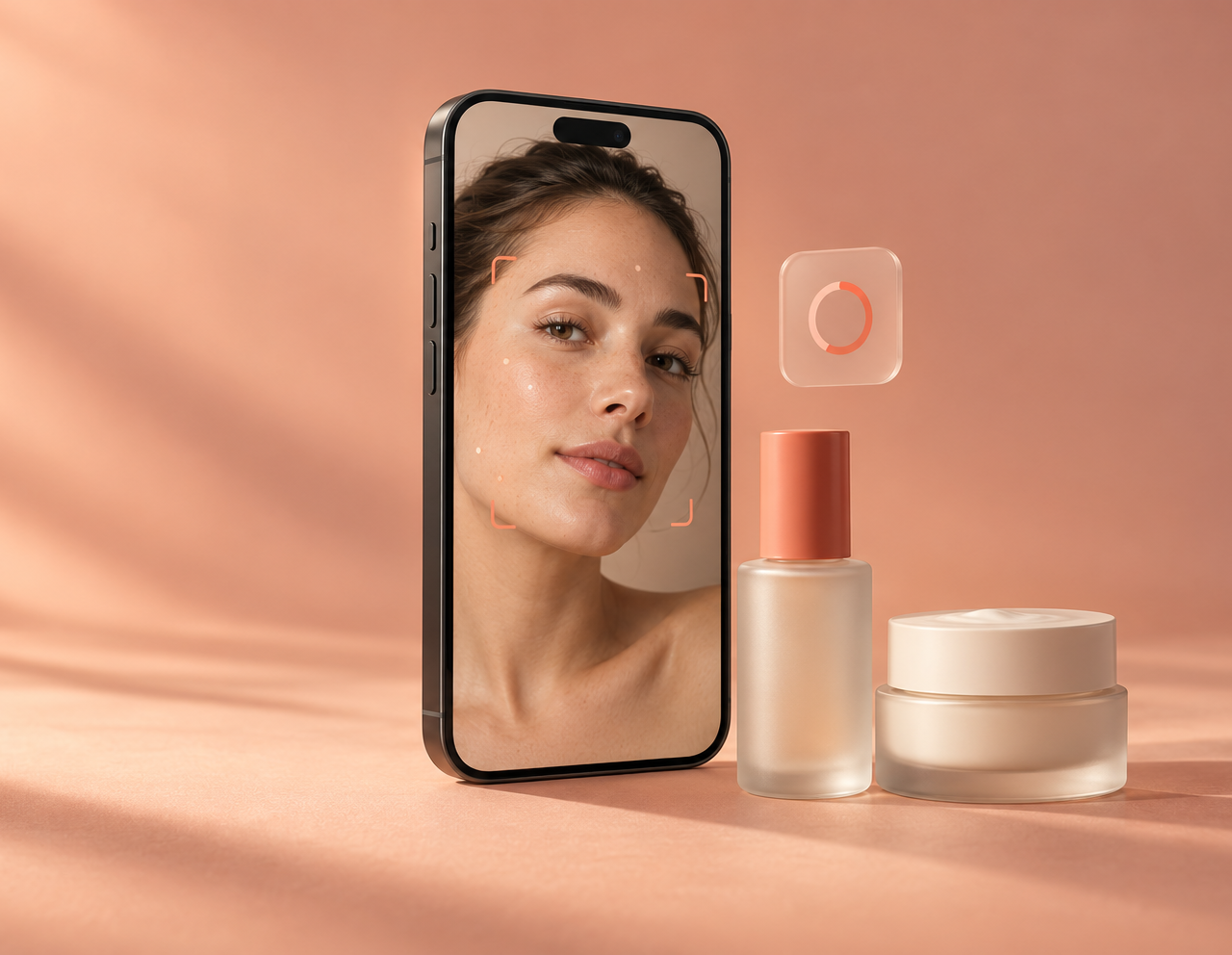
Eight scores from one selfie
Hydration, texture, blemishes, redness, dark circles, firmness, pores and wrinkles, each 0–100 with a note on what was seen — plus an overall score, skin type and an estimated skin age.
 Vessa
VessaVessa scores your skin from one selfie, then builds a morning and evening routine around your goals, your budget and what's already on your shelf — with the reason for every step and what it costs each month.
A skincare app, not medical advice.
Features
Eight skin scores, a routine that keeps to the safety rules, and a fit score on every product — all from the same picture of your skin.
Hydration, texture, blemishes, redness, dark circles, firmness, pores and wrinkles, each 0–100 with a note on what was seen — plus an overall score, skin type and an estimated skin age.
Photograph a product you own and Vessa identifies it — brand, category and ingredients — and adds it to your shelf with a verdict: keep, finish first, duplicate or don't buy again.
Simple, balanced or advanced; essential to no-limit budget. Vessa prefers what you own, explains every swap, and shows what it costs per month and what's left to buy.
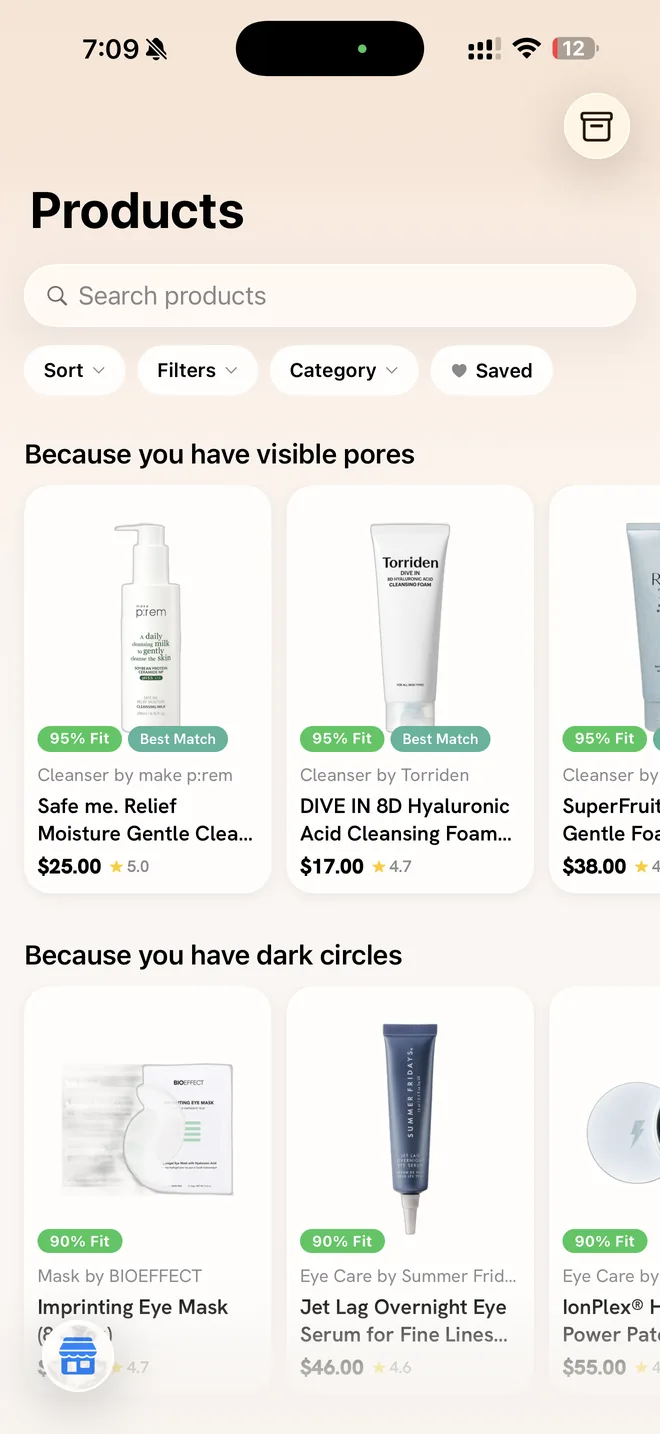
The Products tab opens with what your scan found — “Because you have visible pores”, “Because you have dark circles” — and gives every product a 0–100 fit score built from safety, your skin type, your concerns, your routine and value. Search, sort, filter by price or ingredients, save favourites and compare where each one costs least.
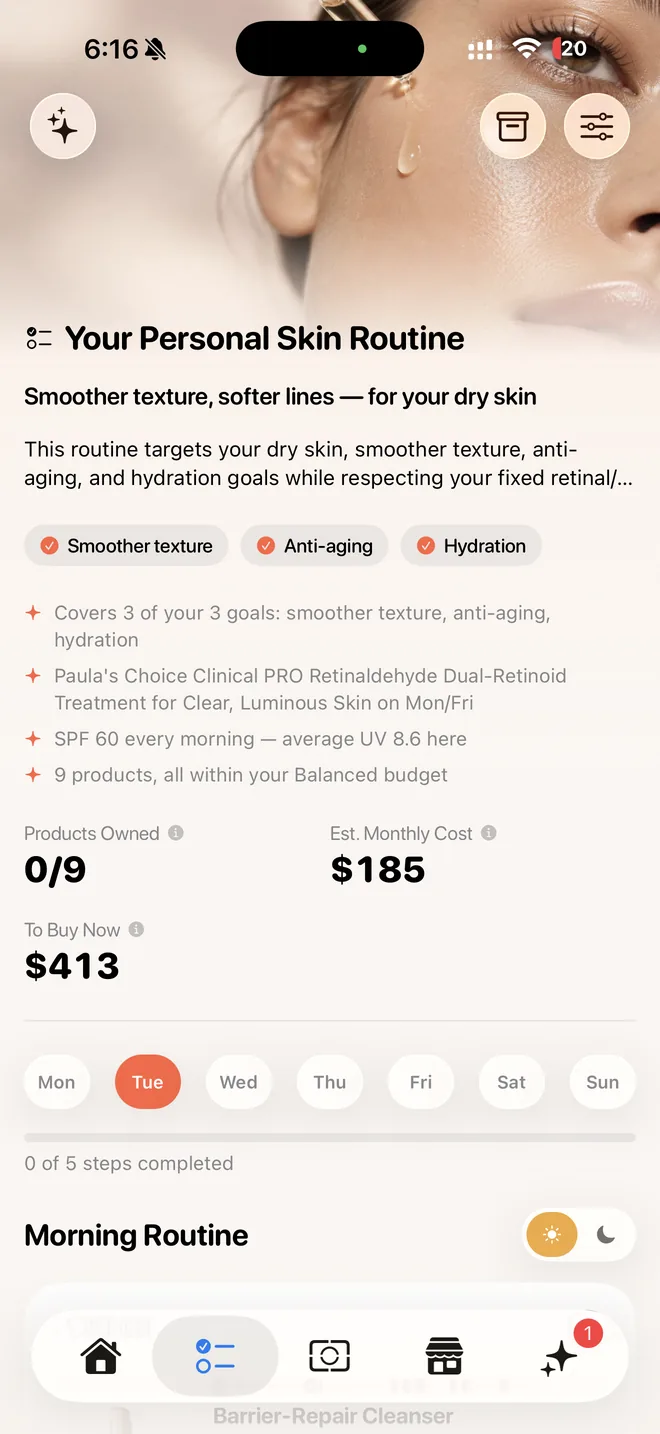
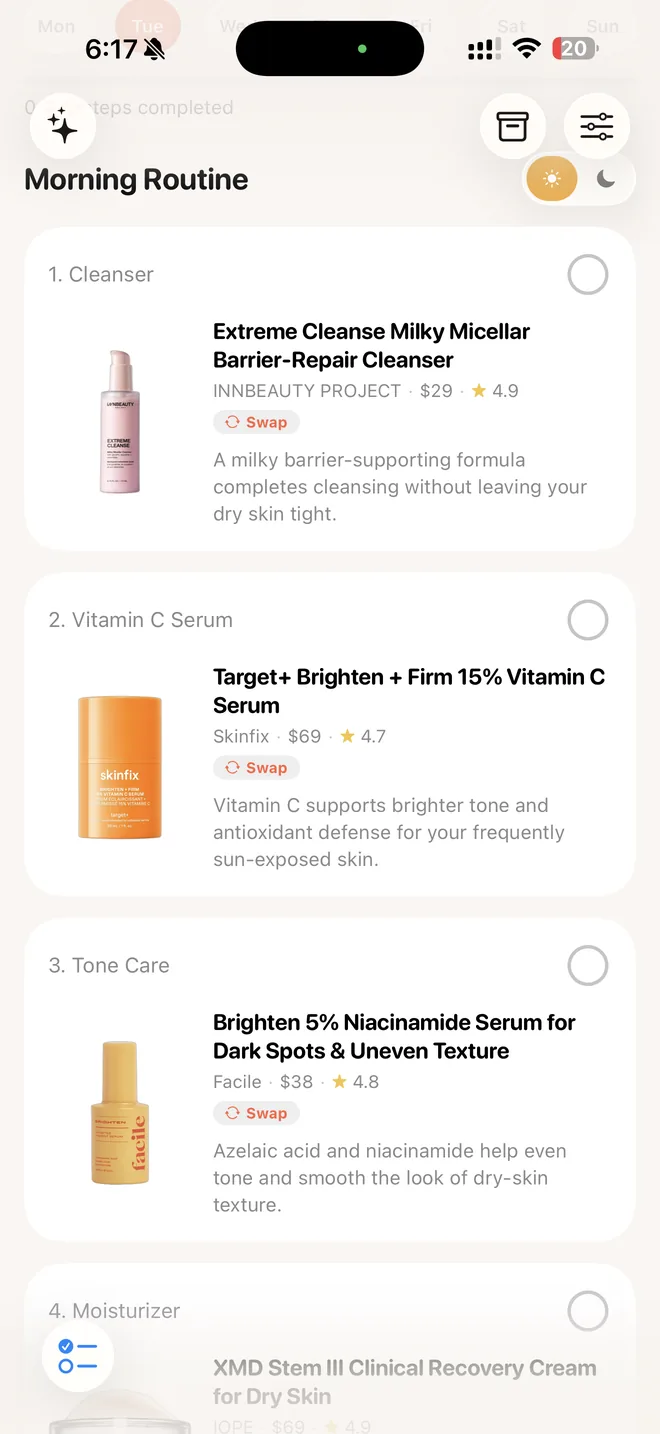
Your routine runs in the right order — cleanse, treat, moisturise, protect — with a line on why each product is there. Swap any step for a cheaper or better-fitting alternative, tick steps off as you go, and let retinoids and exfoliants keep to their own nights.
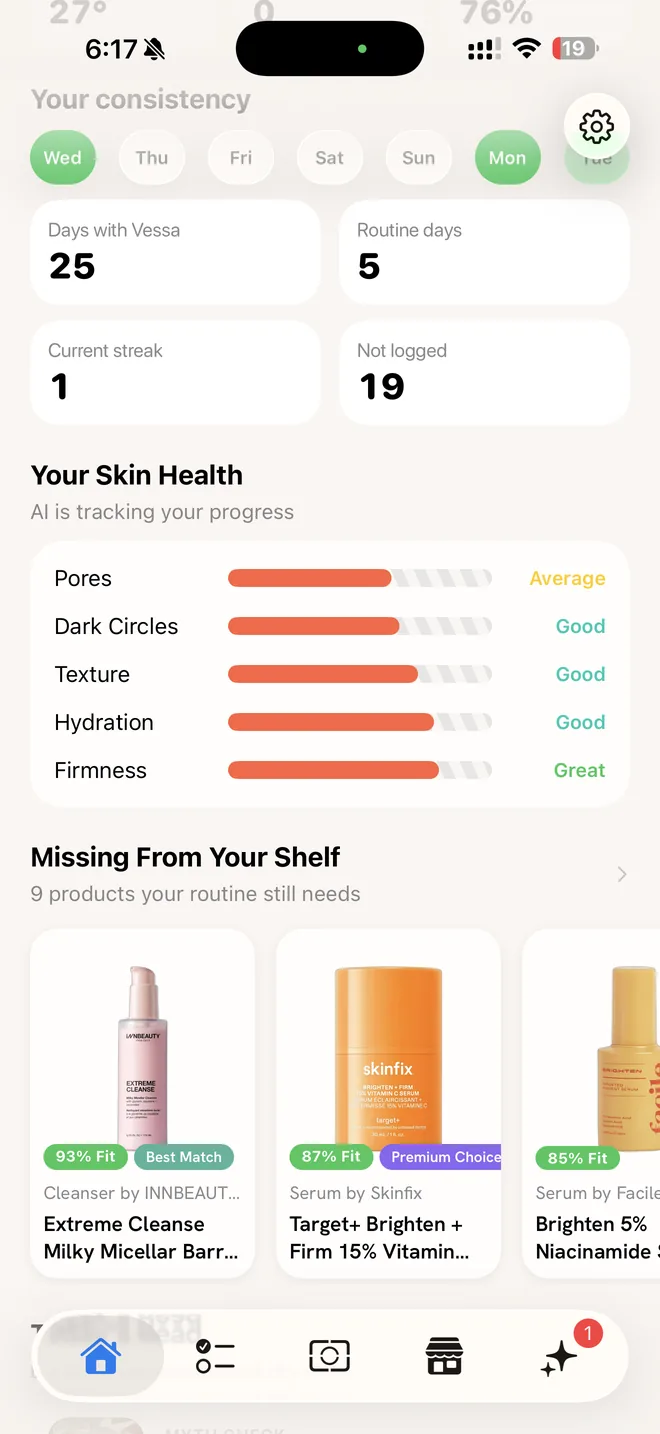
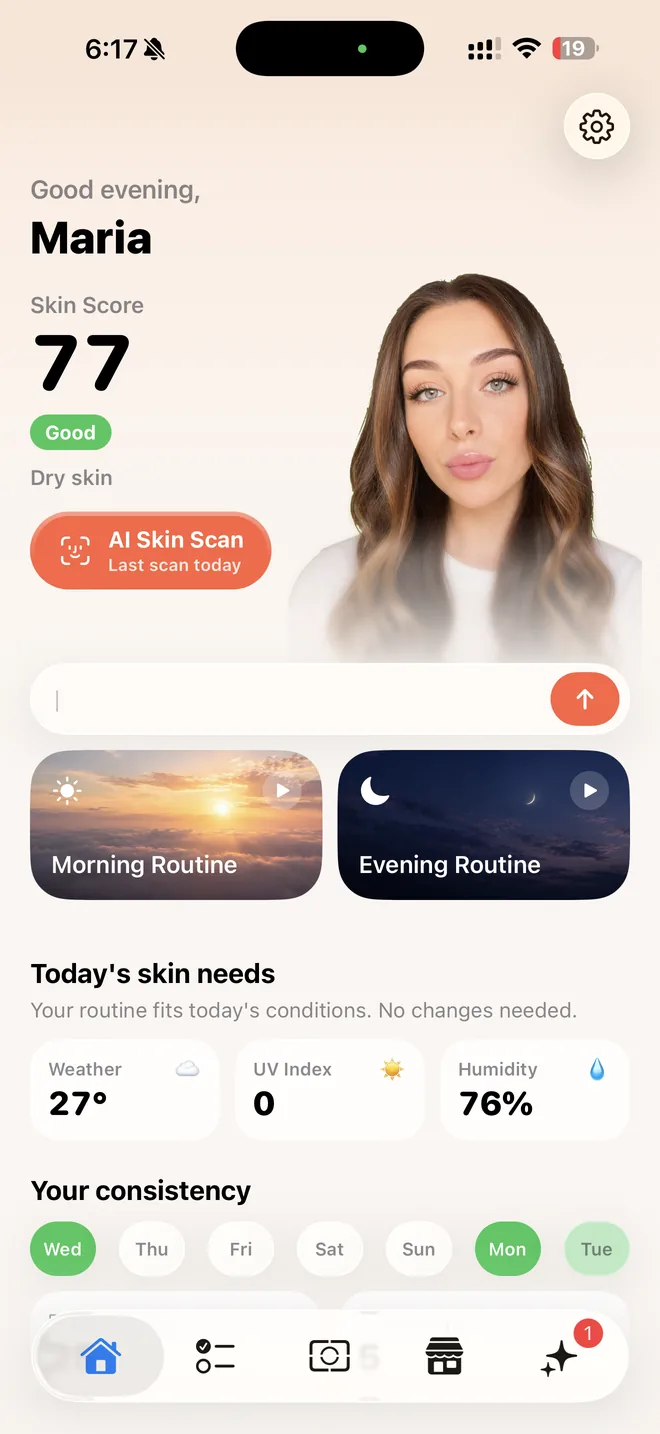
Home brings it together: your skin score and grade, your skin type, a one-tap AI Skin Scan, today's skin needs from your local weather, UV and humidity, your morning and evening routines, how consistent you've been, and the products your routine still needs.
And more
Retinoids and exfoliants never share a night. Pregnancy, a prescription retinoid, allergies and your avoid list are hard rules, not preferences.
It knows your scan, shelf and routine. When the answer means a change — add, remove, swap or reschedule a step — it arrives as a card you apply, and it remembers what you agree.
Set your city and the routine leans on your seasonal UV, humidity and temperature: lighter textures when it's humid, SPF 50+ when UV is high.
Morning and evening routine reminders, a gentler weekend nudge, and a reminder to rescan a week after your last scan.
How it works
One selfie scores hydration, texture, blemishes, redness, dark circles, firmness, pores and wrinkles, with an overall score, your skin type and an estimated skin age.
Your goals, sensitivities, pregnancy, prescriptions, budget and routine size — and scan the bottles you own so the routine can use them.
Morning and evening steps with reminders, swaps and check-offs. Rescan to see how your score moves, and ask Vessa AI when something changes.
All 66 features
Every feature in the app today, from the eight-score face scan to the routine, the Products tab, your shelf, Vessa AI and the home dashboard.
Eight skin scores from one selfie. Each scan scores hydration, texture, blemishes, redness, dark circles, firmness, pores and wrinkles (0–100, higher is better), and each score comes with a one-line note on what was seen.
Overall score with a plain grade. One overall number with a label: Excellent, Very Good, Good, Fair, Needs Attention or High Attention.
Apparent skin age and type. Each scan estimates an apparent skin age (15–75) and reads your skin type (Dry/Normal/Combination/Oily).
A short written summary. Two warm sentences: the strongest thing about your skin, then the one area most worth working on.
Live face-tracking camera. Uses a 3D face mesh on TrueDepth iPhones and a contour mask otherwise, and the shutter only fires when a face is detected. Guidance: straight on, even light, no glasses.
Scan from a photo. You can analyse a photo from your library instead of the live camera.
What each measure means. Each category comes with a plain explainer, for example "Pores can't shrink permanently, but BHA and niacinamide make them far less visible.".
Discuss your scan with AI. One tap from the skin report opens Vessa AI with "Explain my latest skin scan results…".
AI home portrait. After a scan, an image model makes a polished portrait of you for the home screen. Its prompt says identity must be preserved exactly (no slimming, no "beautifying").
Scan first, then a short quiz. Flow: welcome → account → AI permission → face scan → per-category results → questions → location → notifications → plan. Answers pre-fill from the scan where possible (skin type, goals). (stepList, scanSuggestionsFor).
Resume where you left off. Every tap is saved, so quitting mid-onboarding picks up at the same step.
Pregnancy only asked when relevant. The pregnancy question is skipped if you answer "male".
Edit everything later. Routine Settings groups every input into Your Skin, Safety, Personalization and Routine Preferences. "Save & Regenerate" rebuilds the routine. You can also type in your own allergy entries.
Morning and evening routine. A personal AM/PM routine with a one-line headline, a 5–6 sentence explanation, and a "why" for every step.
Strong actives on separate nights. Retinoids are PM only, 2 nights a week if you are new and 3 if you already use them. Exfoliants get 2 different nights and never share one with the retinoid. Non-daily steps show day chips such as "Mon · Thu".
Correct layering order. AM: cleanse → hydrate → treat → eye → moisturize → SPF. PM: cleanse → exfoliate/retinoid → treat → hydrate → eye → moisturize. SPF is always the last morning step.
Keeps what you own. It prefers shelf products that fit, and replaces an owned product only with a stated reason. If you own everything, it says "No new purchases needed.".
Climate-aware choices. It uses seasonal UV, humidity and temperature for your city: lighter textures in humid places and SPF 50+ when UV is high. (getClimate, open-meteo).
Goal coverage chips. Each of your goals shows as covered (with the products covering it) or "not addressed yet".
Cost at a glance. Three tiles: Products Owned, Est. Monthly Cost (price spread over how long each product lasts at your schedule) and To Buy Now.
Swap any step. Pick from 2–3 alternatives for the same slot, tagged by budget tier with the price difference and fit %. The replaced product stays one tap away.
Daily check-offs. Tick off steps or "Mark all as done" for today, and see a rotating encouragement on completion. The log is saved per date and period.
Ask about your routine. The menu has Explain my routine, Does it cover my goals?, Can I simplify it?, Make it cheaper, and Another question.
Regenerate when the shelf changes. If you add or remove products, the routine offers to rebuild for the new shelf.
Full routine sheet. Every step, morning and evening, in one list.
Pregnancy is a hard rule. If you are pregnant or breastfeeding, retinoids are removed, and so are hydroquinone and salicylic leave-ons (cleansers excepted).,.
Works around prescriptions. On a prescription retinoid it never adds a second retinoid. The chat never tells you to stop or change a prescription.
Retinol-free on request. "Rather avoid it" keeps the whole retinoid family out, and this still holds when the routine is regenerated.
Avoid list and allergies. Fragrance, drying alcohols, essential oils, silicones and typed allergies are checked against INCI ingredient lists.
Gentler for reactive skin. Fewer new actives at once, fragrance-free picks, and no strong acids for reactive or dry skin.
Conflict notes on products. Product pages show "Don't mix with" and "Pairs with" lists. Built-in conflict rules: retinoid + BHA, retinoid + vitamin C, BHA + azelaic acid.
0–100 fit score on every product. It weighs Safety, Skin Type, Your Concerns, Routine Fit and Value. Each product page shows factor bars, why it fits, warnings and hard blockers.
"Because you have …" rows. The For You feed opens with your two lowest-scoring scan concerns (below 75), for example "Because you have dark circles", followed by "Recommended <slot>" rows for steps your routine lacks and then Top by Fit, Top Rated and Most Reviewed.
Search, sort, filter, category. Sort by Best Fit, Top Rated, Most Reviewed or price. Filters: Missing from Shelf, Fragrance-free, Alcohol-free, Under $25, $25–50, $50+, 4.5★+. You can also filter by category and type.
Saved products. A heart on any product saves it, and a "Saved" pill shows only saved items.
Product page. Shows rating, price, description, how to apply, ingredients (key actives highlighted), compatibility, alternatives, and Ask AI.
Where to buy. Compares prices across retailers (Sephora, Dermstore, Amazon, Walmart), cheapest first, with the saving. (Where to Buy).
Duplicate warning. Flags when you already own a product that does the same job: "You probably don't need both.".
Scan a bottle to add it. Photograph any product (camera or photo library). It is identified with brand, category, price and ingredients. Faces and non-beauty objects are refused, and you are asked to retake unclear shots.
Scan chooser. The centre tab button opens two choices: "Scan My Face" and "Scan a Product".
My Shelf, grouped. Owned products are grouped as In Routine, Not Used and Not Recommended. A verdict line runs from Excellent to Needs Improvement. Tiles show Shelf Fit, Missing Products, Not Recommended and Don't Buy Again.
AI verdict per owned product. Each item is tagged Keep, Finish First, Duplicate, Do Not Repurchase, Not Recommended, Optional or Needs Review, with a reason of 20 words or fewer.
Add from Products. You can also add owned items by searching the catalogue.
Knows your skin context. It has your profile, latest scan, shelf and routine, and it opens by saying so.
Changes arrive as cards. It can add, remove or replace a product, or change a step's days or morning/evening timing. Nothing is applied until you tap Apply.
Remembers what you agree. Allergies, products that stung, dislikes, retinoid/exfoliant nights and texture preferences are kept, and future routines respect them.
Shows real products. It searches the catalogue and shows tappable product cards, and it never invents products or prices.
Replies in your language. It answers in the language you write in.
Starter prompts and follow-ups. 12 starter cards (e.g. "Do my products conflict?", "How much SPF is enough?") and suggested follow-up chips after replies.
Saved chat history. Multiple conversations are stored to your account and survive a reinstall, and you can delete them. A new routine opens its own chat explaining how your shelf fits.
Knows its limits. It does not diagnose, read moles or rashes, give prescription doses or advise on procedures. It points you to a dermatologist (same week if something is spreading, painful or bleeding).
Skin Score hero. Greeting, your name, overall score with grade, skin type, "+N since last scan", and an AI Skin Scan button showing "Last scan N days ago".
Today's skin needs. One line built from local UV, humidity, temperature and your routine, for example "High UV today. Reapply sunscreen while outdoors…". Weather, UV Index and Humidity tiles open the city picker.
Morning/Evening routine cards. Shortcuts into today's routine.
Your consistency. A 7-day pill calendar (done/partial) plus Days with Vessa, Routine days, Current streak and Not logged.
Your Skin Health. Bars for your five lowest-scoring measures. Tapping opens the full skin report.
Missing From Your Shelf. Lists the routine products you don't own yet and opens Products pre-filtered to them.
Today's Read. An article of the day with a reason, for example "Because UV is high in your area today". There are 10 bundled guides as an offline fallback (retinol, barrier, layering, SPF, pregnancy, post-procedure care…).
Routine reminders. Daily at 08:00 and 21:00, plus a quieter 09:00 "slow morning" on weekends. They are personalised with your name and main goal.
Scan reminder. A nudge 7 days after your last scan. Both reminder types can be toggled in Settings.
Trial reminder. A heads-up before the free trial converts, if notifications are on.
Sign in. Email and password, or Sign in with Apple. Forgot password works by link or 6-digit code.
AI permission screen. Before the first scan, it states exactly what is sent (face scans, product photos, profile, shelf, chat) and to whom (OpenAI, US). It can be switched off in Settings → AI Features.
Private photos, EU storage. Face photo, portrait and product photos sit in a private bucket and are shown via 1-hour signed links. Data is hosted in Frankfurt, Germany. Only the latest face photo is kept (privacy policy §5).
Delete account in-app. A two-step confirmation erases scans, photos, routine and chats immediately. It is also reachable from the paywall.
Settings. Name, subscription status (renews/ends date), city, notifications, AI Features, Help & Support, Privacy, Terms, Rate the App, Sign Out.
FAQs
Answers to what people ask most about Vessa: what it does, what it doesn't, your data and your subscription. Can't find yours? Write to us.
Eight things, each scored 0–100: hydration, texture, blemishes, redness, dark circles, firmness, pores and wrinkles. You also get an overall score with a grade, your skin type and an estimated skin age. Each measure is tracked separately, so you can see texture improve while redness stays put.
It reads what a photograph can show: surface signs, in consistent light. It is a way to measure change in your own skin over time, not a diagnosis, and it cannot see anything below the surface.
No. Vessa prefers the products on your shelf when they fit, and when it does suggest something new or a replacement it says why. The routine shows how many products you own, what it costs per month and what's left to buy, and every step can be swapped for a cheaper alternative.
Point the camera at a bottle. It identifies the product, reads its ingredients and adds it to your shelf — no typing, no barcode hunting. You can also add products by searching the Products tab.
Say so in your profile and it becomes a hard rule, not a preference: retinoids, hydroquinone and leave-on salicylic acid drop out while you're pregnant or breastfeeding, and on a prescription retinoid Vessa never adds a second one. Vessa AI never tells you to stop or change a prescription.
Yes. It is software reading a photo, and it says what it is unsure about. Anything painful, spreading or changing quickly belongs with a dermatologist — the app will tell you so rather than sell you a serum.
Into your own private storage on Vessa's servers in Frankfurt, Germany (EU), shown to you only through short-lived links, and to the AI models that score them (OpenAI, which doesn't train on them, and only after you allow it). Only your latest face photo is kept. Deleting your account deletes your data.
Whenever you like, though skin moves slowly. Every week or two is plenty; Vessa reminds you a week after your last scan, and asks for similar light each time so scans compare like with like.
Your first face scan and its results are free. The routine, your shelf, the Products tab and Vessa AI come with a subscription — monthly or annual, each starting with a 3-day free trial, billed by Apple and cancellable any time. You see the price before anything is charged.
No. Vessa is a skincare app, not a doctor. It will not diagnose a condition, and it is built to send you to one when something warrants it.
Oily, dry, combination and normal. If you aren't sure, choose "Not sure" in settings and the scan estimates it. Reactive skin gets gentler picks and slower introduction of actives.
Retinoids run in the evening only, two nights a week if you're new and three if you already use them. Exfoliants get two different nights, so the two never share an evening. Sunscreen is always the last morning step.
It's a 0–100 match for your skin, weighted across safety, skin type, your concerns and latest scan, routine fit and value. Each product page shows the factor breakdown, why it fits and any warnings. A safety conflict (for example fragrance on your avoid list) caps the score low.
No. Budget only changes the ranking and which tier the routine picks from. Safer options are never hidden, and cheaper equivalents appear as alternatives you can swap in.
Yes. Each step offers two or three alternatives from the same role, labelled by price tier with the price difference and fit. The product you replaced stays one tap away.
Yes. Set your city and the home screen shows today's UV, humidity and temperature with one line on what that means for your routine. The routine itself uses seasonal climate to pick textures and SPF strength.
If you allow notifications, you get a morning reminder at 8:00, an evening one at 21:00, a gentler weekend morning nudge, and a reminder to rescan a week after your last scan. Each can be switched off in Settings.
Things you settle in chat, such as an allergy, a product that stung, or the nights you want retinol. Future routines keep to them. Chats are saved to your account and can be deleted.
Yes. Every product on your shelf gets a verdict (Keep, Finish First, Duplicate, Do Not Repurchase, Not Recommended, Optional) with a short reason, and duplicates are flagged.
Where retailer prices are available, the product page compares them across stores like Sephora, Dermstore, Amazon and Walmart and shows the saving.
Yes. Both the monthly and annual plans start with a 3-day free trial, billed by Apple. You can cancel in iOS Settings, and the app reminds you before the trial ends if notifications are on.
Vessa is built for iPhone. There is no Android version, and on iPad it runs in iPhone compatibility mode.
One selfie gives you eight scores and a routine built around the products already in your bathroom. Your first scan is free, on iPhone.