

One shelf, three groups
Your products are grouped as In Routine, Not Used and Not Recommended. Tiles show Shelf Fit, Missing Products, Not Recommended and Don't Buy Again.
Shelf and reminders
Keep your skincare on one shelf with a verdict on each product, such as keep, finish first or duplicate. Then get morning and evening routine reminders.
A skincare app, not medical advice.
Scan a product and tap Add to Shelf, or search the Products tab.
Each product gets a verdict and a short reason.
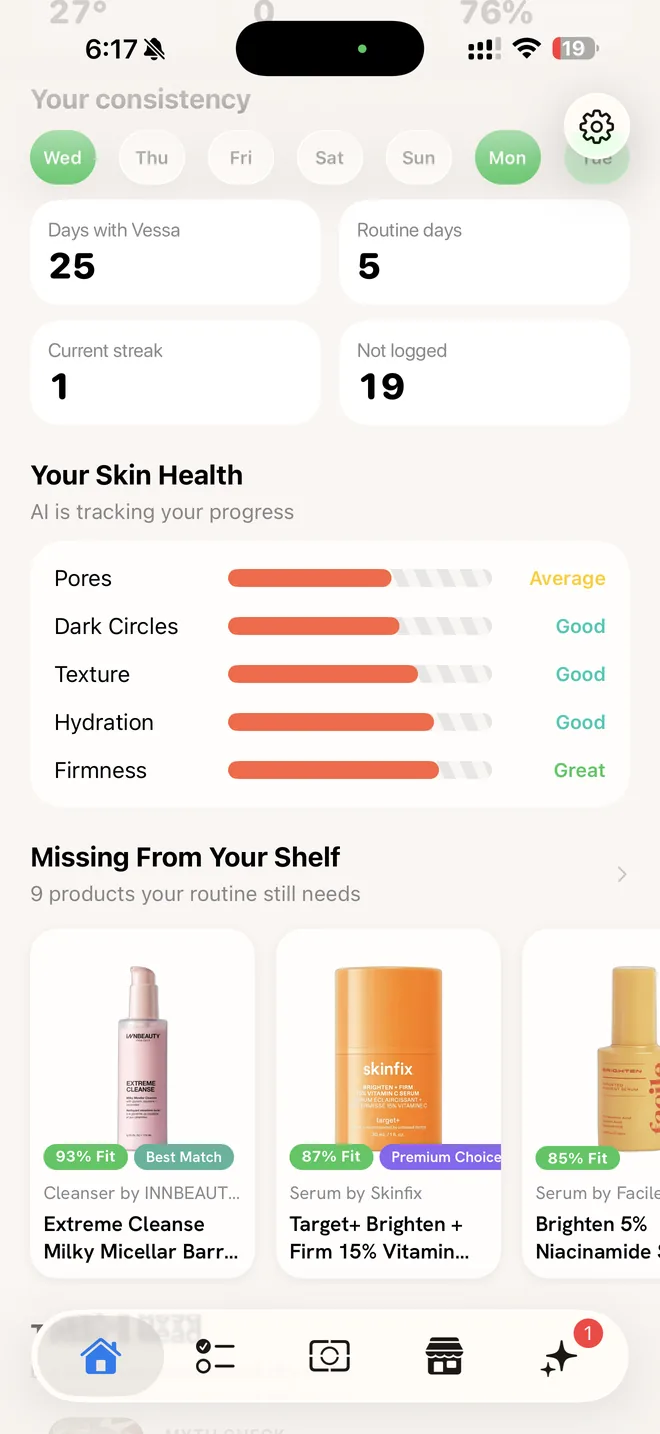
Home lists the routine products you don't own yet.
Reminders in the morning and evening, and check-offs as you go.
Your products are grouped as In Routine, Not Used and Not Recommended. Tiles show Shelf Fit, Missing Products, Not Recommended and Don't Buy Again.
Each product on your shelf gets a tag with a reason of 20 words or fewer.
If you allow notifications, you get a morning reminder at 8:00 and an evening one at 21:00, with a quieter 9:00 nudge on weekends. A scan reminder comes a week after your last scan. You can switch both off in Settings.
Tick off steps as you go. Home shows a seven-day calendar, your days with Vessa, routine days, current streak and days not logged.
Set your city and Home shows today's weather, UV and humidity, with one line on what that means for your routine.
More answers on the FAQ page.
Vessa tags every product on your shelf, for example Keep, Finish First, Duplicate or Do Not Repurchase, with a short reason.
Yes. It flags when you already own a product that does the same job.
At 8:00 and 21:00, with a gentler 9:00 nudge on weekends, if you allow notifications. Each type can be switched off in Settings.
No. You can also add products by searching the Products tab.